Case Study Next.js 15 · Gemini 2.5 Flash · Genkit · Supabase · TypeScript

NutriPal — snap a photo, know what you ate.

AI-powered nutrition assistant that turns food photos into personalized meal insights. Built to stay reliable under free-tier AI rate limits — with a 4-key rotation system, typed AI contracts, and realtime dashboard sync.

Type Solo project · Full-stack AI app · Production deployed Stack Next.js 15 · React 19 · Genkit · Gemini 2.5 Flash · Supabase AI Vision analysis · Meal planning · Delivery curation · Diet personalization Live nutripal-rho.vercel.app
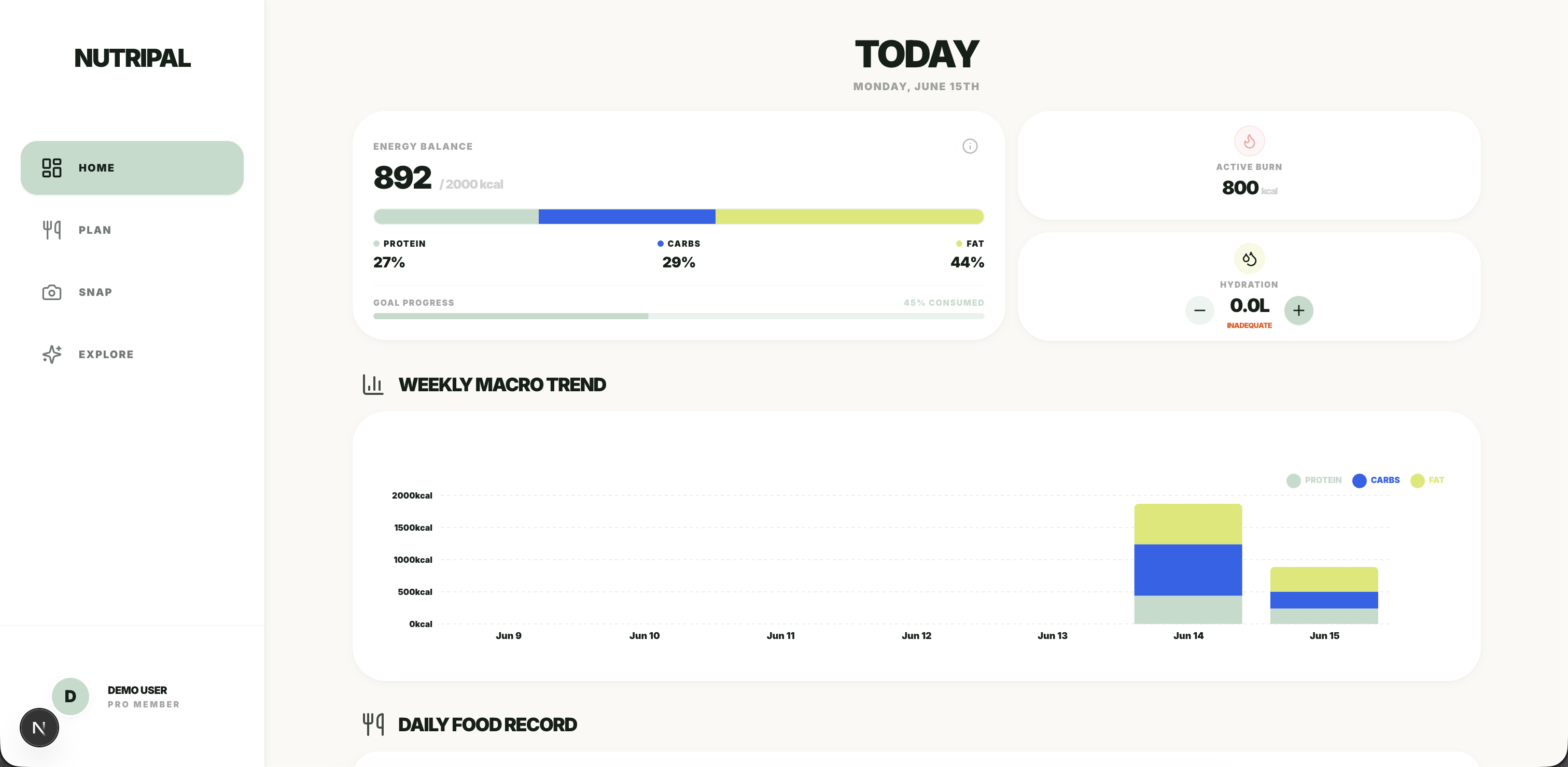
NutriPal dashboard showing today's energy balance and macro breakdown
Dashboard · Today
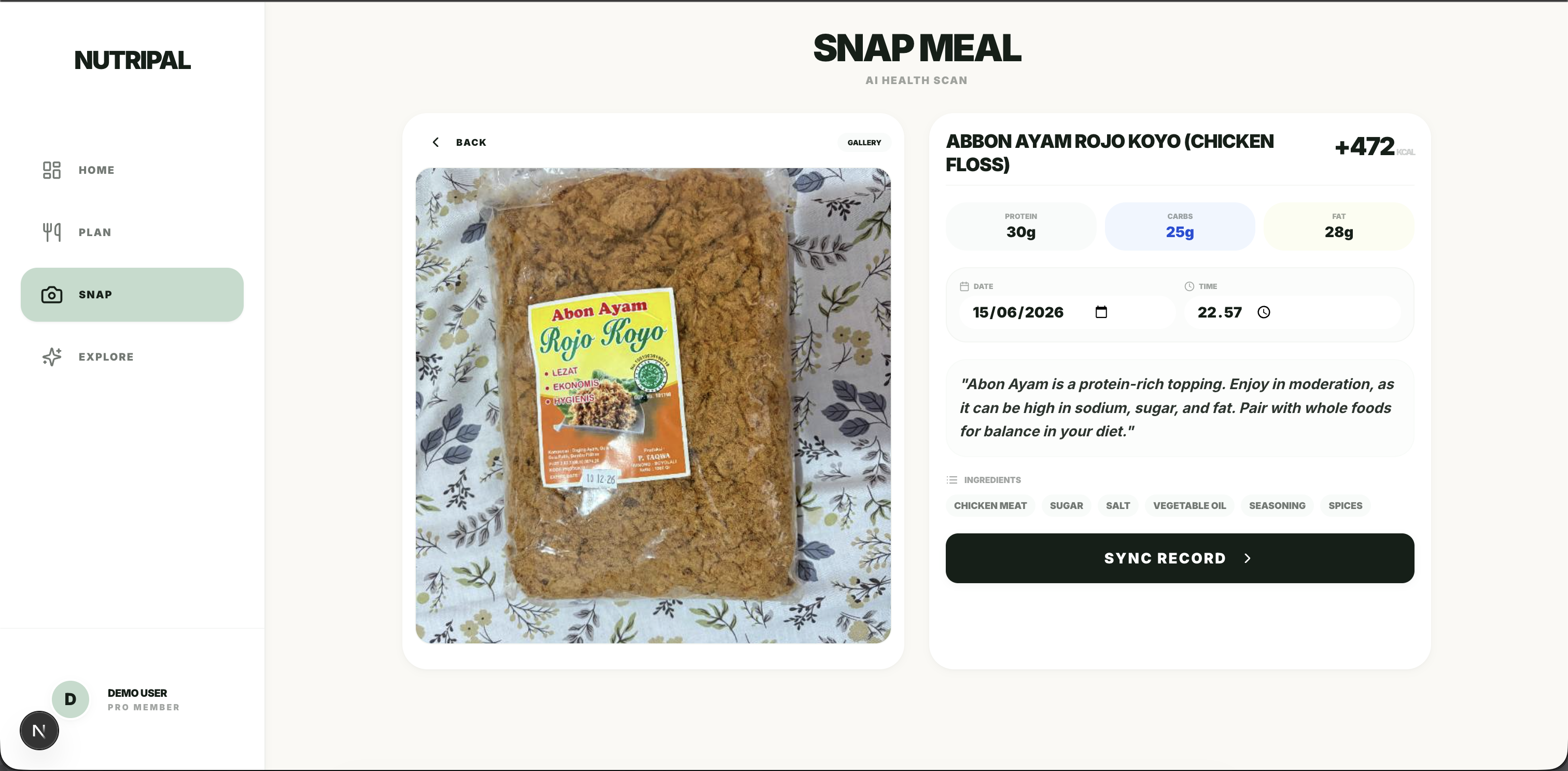
NutriPal Snap feature showing AI food photo analysis result
Snap · Photo → Nutrition
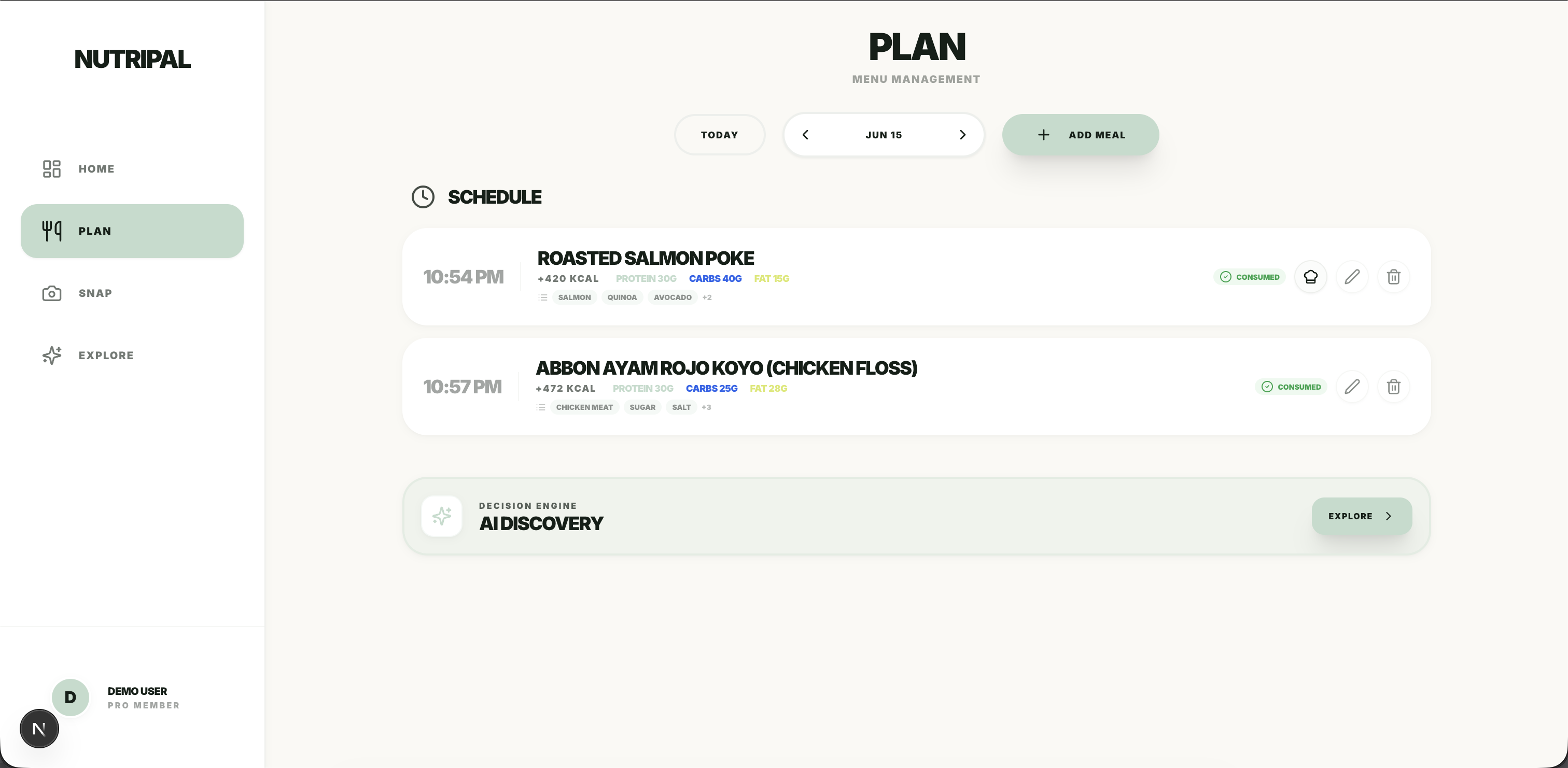
NutriPal meal planner with AI-generated daily plan
Planner · AI Meal Plan
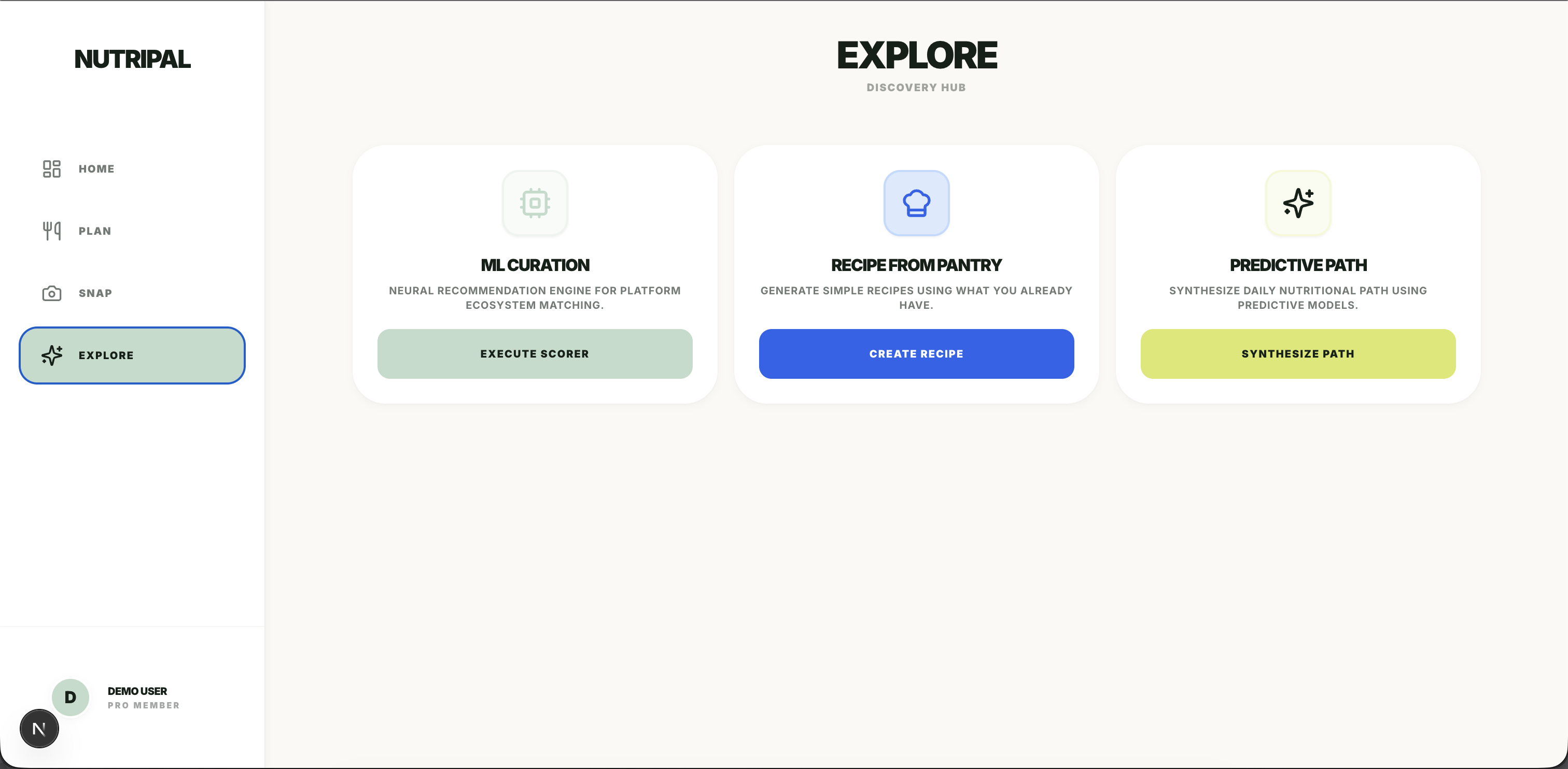
NutriPal Explore Hub showing AI delivery curation and recipe suggestions
Explore · AI Discovery
5
Genkit AI flows
vision · text · planning · curation · diet
4
API key rotation
zero single point of failure
10+
App routes
dashboard · snap · planner · explore
99%
TypeScript
end-to-end type safety
01 · Problem Statement

Why do calorie-tracking apps fail their users?

Every calorie tracker forces you to search a database, guess portions, and log everything manually. The friction is the reason people quit. What if the app did the thinking for you — from a single photo?

Most nutrition apps suffer from the same three problems: manual logging is tedious, AI nutrition estimates are unreliable without validation, and free-tier AI services introduce rate-limit failures that crash the experience. NutriPal was built to solve all three — not as separate features, but as a coherent engineering challenge.

Three hard constraints shaped the architecture from day one:

"The photo is the interface. Everything else is infrastructure."
02 · Business Impact

From one photo to a complete nutrition loop.

The value isn't just calorie counting — it's removing every point of friction between the user and their health data.

IN
User uploads food photo
camera or gallery · no manual lookup
Trigger
01
Gemini Vision analyzes the dish
identifies food · estimates macros · checks allergens
AI
02
Zod validates structured output
schema-safe · no malformed data reaches the UI
Validation
03
Result stored in Supabase
PostgreSQL · Row-Level Security · source of truth
Database
OUT
Dashboard updates in real time
macros recalculate · no page refresh · instant feedback
Realtime

User Value

  • No manual calorie lookup — one photo does it
  • Personalized recommendations based on BMI, allergies, and goals
  • Real-time nutrition tracking that feels instant

Engineering Value

  • Resilient against Gemini rate limits via 4-key rotation
  • Schema-safe AI outputs — Zod throws before bad data reaches the UI
  • Realtime architecture without a state library or WebSocket complexity
03 · System Architecture

Three layers, one coherent system.

Next.js handles rendering and routing. Genkit owns all AI logic. Supabase manages data, auth, and realtime sync. Each layer has one job and doesn't bleed into the others.

IN
User Input
Photo upload · text input · biometric form · date selection
User action
01
Next.js 15 — App Router
Server Components · Server Actions · route handlers
Frontend
02
Genkit AI Layer
5 typed flows · Zod schema validation · 4-key rotation on every call
AI
03
Gemini 2.5 Flash
Text + Vision multimodal · structured JSON output
LLM
04
Supabase — PostgreSQL + Realtime
Row-Level Security · anonymous auth · live channel subscriptions
Database
OUT
Live UI Update
Dashboard reflects change without page refresh · macros recalculate instantly
Realtime

Design principles that held the system together.

AI-First Interaction
Every major user action — snap, plan, explore — triggers an AI flow. AI is the product, not a bolt-on.
Database as Source of Truth
No global state store. Each hook subscribes directly to Supabase realtime channels, keeping UI and database always in sync.
Typed Contracts Everywhere
Zod schemas on every AI flow input and output. 99% TypeScript. If the shape is wrong, it throws — not silently corrupts.
Infrastructure-Level Resilience
Rate limit handling is baked into the AI layer, not the UI. Users never see a quota error — the rotation wrapper handles it invisibly.
04 · End-to-End User Journey

From onboarding to daily habit.

The product is designed as a loop: onboard once, use every day. Each screen connects to the next.

05 · AI System Design

Five flows, one typed contract each.

Every AI feature in NutriPal is a Genkit flow — a typed, server-side function with a Zod input schema and Zod output schema. The model never returns free-form text; it returns a validated object or throws.

📸
analyze-meal
Food Photo Analysis
Photo data URI + user allergies → name, calories, macros, health score, ingredients, expert insight, allergen warning.
  • Gemini Vision multimodal
  • Allergy audit in same prompt
  • Max 180-char expert insight
✏️
analyze-text-meal
Text Meal Analysis
Meal name + ingredients as text → full nutrition breakdown, health score, cooking instructions. No photo required.
  • Text-only Gemini call
  • Structured JSON output
  • Instant from meal planner
📅
generate-daily-plan
AI Meal Plan Generator
Calorie target + macro % + diet type + allergies → full breakfast/lunch/dinner with recipes, timing, and swap alternatives.
  • Macro-balanced planning
  • Full recipes per meal
  • Swap suggestion included
🛵
curate-meal-suggestions
Delivery Curation
Scores and ranks food delivery options against the user's health profile, calorie target, and dietary markers.
  • Profile-aware ranking
  • Multi-option scoring
  • Delivery-context aware
🥗
personalized-diet-plans
Personalized Diet Plans
BMI + health markers + goals → longer-horizon diet recommendations. Includes "pantry to recipe" feature.
  • BMI-aware recommendations
  • Pantry-based recipe gen
  • Goal-aligned suggestions

LLMs are non-deterministic. Without output validation, a single malformed response can crash the UI or silently show wrong data. Every Genkit flow defines both an input schema and an output schema using Zod. If Gemini returns something that doesn't match — wrong types, missing fields, out-of-range values — the flow throws before the data ever reaches the frontend. See the exact schema in the Technical Deep Dive below.

06 · Engineering Challenges

Three challenges that shaped the architecture.

The decisions that kept the app alive under real infrastructure constraints — not just "what did I build" but "what went wrong and how did I fix it."

1
Rate Limit Resilience
Problem

Free-tier Gemini keys fail under concurrent traffic. A single key hits its requests-per-minute cap the moment two users hit the app simultaneously — crashing every AI feature silently.

Solution

Built executeWithRotation — a wrapper that tries key 1, catches any 429/quota/rate-limit error, then immediately retries with key 2, 3, 4. All 5 AI flows use this wrapper. The user never sees a rotation error.

Impact

4 free-tier keys behave as one production-grade key pool. Zero rate-limit errors exposed to users. Retry logic is fully invisible at the AI layer.

2
Stale Dashboard After AI Analysis
Problem

After the Snap flow completes AI analysis and writes to the database, the dashboard shows stale data. The user has to manually refresh — which makes the app feel like a form, not a product.

Solution

Replaced global state (Redux/Zustand) with custom hooks that subscribe directly to Supabase realtime channels. useDailyLog, useMeals, useProfile each own a channel scoped to the current user.

Impact

When analyzeMeal writes to food_records, the dashboard re-renders automatically — no polling, no prop drilling, no manual refresh. Database is the single source of truth.

3
Unsafe AI Output Breaking the UI
Problem

Raw Gemini API calls return untyped JSON. A single malformed response — wrong field name, out-of-range calorie value, missing macro — can silently corrupt the dashboard or throw a runtime error.

Solution

Every Genkit flow defines a Zod input schema and Zod output schema. If Gemini returns something that doesn't match the contract, the flow throws before data reaches the frontend. Genkit also provides a local dev UI to inspect each flow run in isolation.

Impact

No silent data corruption. Type errors surface during development via TypeScript, not at runtime in production. Debugging time cut significantly by running npm run genkit:dev to test flows before touching the frontend.

07 · Technical Deep Dive

The code that makes the three challenges work.

AI Output Validation — Zod schema on analyze-meal

Every field has a type constraint. healthScore is bounded 0–100. expertInsight is capped at 200 chars to prevent model verbosity. allergenWarning is optional — the schema encodes the business rule.

// Output schema — Gemini must return exactly this shape or the flow throws
const AnalyzeMealOutputSchema = z.object({
  name:            z.string(),
  calories:        z.number(),
  macros: z.object({
    protein:       z.number(),
    carbs:         z.number(),
    fat:           z.number(),
  }),
  healthScore:     z.number().min(0).max(100),
  expertInsight:   z.string().max(200),
  allergenWarning: z.string().optional(),
});

Key Rotation — 4-key failover at the AI layer

The loop tries each key in sequence. If a rate-limit error is caught and there are keys remaining, it continues to the next. Only after all keys are exhausted does the error propagate up — and the user never sees it happen.

for (let i = 0; i < GEMINI_KEYS.length; i++) {
  try {
    const tempAi = genkit({ plugins: [googleAI({ apiKey: GEMINI_KEYS[i] })] });
    return await fn(tempAi);
  } catch (error) {
    if (isRateLimitError(error) && i < GEMINI_KEYS.length - 1) {
      continue; // rotate to next key transparently
    }
    throw error; // all keys exhausted — surface the error
  }
}

Realtime Subscription — database as the state layer

Each hook subscribes to a Supabase channel scoped to the current user and date. When any row changes — from any device, from any AI flow — the hook fires and the component re-renders. No Redux, no polling, no prop drilling.

// useDailyLog.ts — Supabase realtime replaces global state
useEffect(() => {
  const channel = supabase
    .channel(`food-${userId}-${date}`)
    .on('postgres_changes', {
      event: '*', schema: 'public', table: 'food_records',
      filter: `user_id=eq.${userId}`
    }, () => fetchRecords())
    .subscribe();

  return () => { supabase.removeChannel(channel); };
}, [userId, date]);
08 · Future Improvements

What I'd build next.

The 4-key rotation works — but it's a workaround for a quota constraint, not a scalable solution. Here's what production-grade looks like from here.

09 · Lessons Learned

Building AI products is infrastructure work.

The AI itself — calling Gemini, writing a prompt — is the easy part. The hard part is everything around it.

"Rate limits aren't a billing problem. They're an architecture problem."
See it live

Try NutriPal, or read the code.

The full source is on GitHub — every Genkit flow, the rotation system, custom hooks, and Supabase schema. The live demo is on Vercel with a demo login (no account needed).